

𝗔𝗜-𝗮𝘀𝘀𝗶𝘀𝘁𝗲𝗱 𝗱𝗲𝗯𝘂𝗴𝗴𝗶𝗻g is rapidly becoming an essential part of 𝗞𝘂𝗯𝗲𝗿𝗻𝗲𝘁𝗲𝘀 𝗼𝗽𝗲𝗿𝗮𝘁𝗶𝗼𝗻𝘀. Tools like 𝙠𝙪𝙗𝙚𝙘𝙩𝙡-𝙖𝙞 help engineers and operators interpret logs, diagnose failures, generate YAML, and apply best-practice configurations simply by asking questions 𝗶𝗻 𝗻𝗮𝘁𝘂𝗿𝗮𝗹 𝗹𝗮𝗻𝗴𝘂𝗮𝗴𝗲.
There is one major 𝗹𝗶𝗺𝗶𝘁𝗮𝘁𝗶𝗼𝗻, though: kubectl-ai works 𝗼𝗻𝗹𝘆 through the 𝗖𝗟𝗜.
For many developers, platform engineers, students, or cross-functional teams, using a 𝘁𝗲𝗿𝗺𝗶𝗻𝗮𝗹 𝗶𝘀 𝘂𝗻𝗰𝗼𝗺𝗳𝗼𝗿𝘁𝗮𝗯𝗹𝗲 or 𝘂𝗻𝗳𝗮𝗺𝗶𝗹𝗶𝗮𝗿. This creates a real barrier, especially in educational environments or collaborative debugging scenarios.
So 𝗜 𝗯𝘂𝗶𝗹𝘁 a solution. kubectl-ai WebUI, a fully 𝗯𝗿𝗼𝘄𝘀𝗲𝗿-𝗯𝗮𝘀𝗲𝗱 interface for kubectl-ai, designed to make AI-driven Kubernetes troubleshooting accessible to everyone.
Prompt with “enabled cluster changes”:
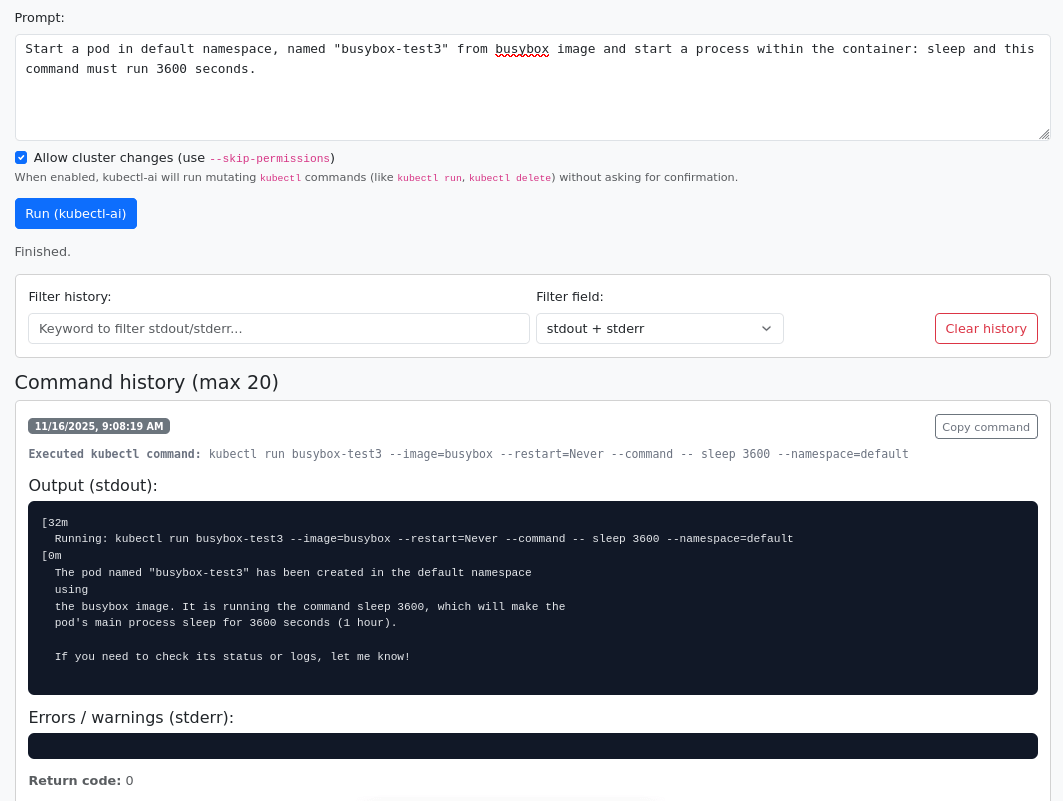
𝗪𝗵𝗮𝘁 𝗶𝘀 𝗸𝘂𝗯𝗲𝗰𝘁𝗹-𝗮𝗶?
kubectl-ai is a CLI extension that integrates:
Kubernetes cluster context
AI reasoning (OpenAI, Anthropic, etc.)
Real-time command generation and diagnostics
𝗜𝘁 𝗰𝗮𝗻:
Analyze pod logs
Explain error messages
Suggest fixes
Troubleshoot deployments
Generate working Kubernetes YAML
But again, all of this requires 𝘂𝘀𝗶𝗻𝗴 𝗮 𝘀𝗵𝗲𝗹𝗹.
𝗪𝗵𝘆 the CLI-Only Experience Is 𝗮 𝗣𝗿𝗼𝗯𝗹𝗲𝗺
For many people:
the terminal is intimidating
command syntax feels overwhelming
mistakes are easy to make
visual feedback is limited
learning curve is high
In workshops, training sessions, and team onboarding, I’ve consistently seen that 40–60% of 𝘂𝘀𝗲𝗿𝘀 𝗽𝗿𝗲𝗳𝗲𝗿 𝗴𝗿𝗮𝗽𝗵𝗶𝗰𝗮𝗹 𝘁𝗼𝗼𝗹𝘀. That’s exactly why the WebUI was created.
𝗜𝗻𝘁𝗿𝗼𝗱𝘂𝗰𝗶𝗻𝗴 - What is the kubectl-ai WebUI ?
A browser interface that brings kubectl-ai to everyone :
- No terminal required :
Just 𝗼𝗽𝗲𝗻 the 𝗯𝗿𝗼𝘄𝘀𝗲𝗿 𝗮𝗻𝗱 𝗮𝘀𝗸 𝗾𝘂𝗲𝘀𝘁𝗶𝗼𝗻𝘀 such as:
“Why is this pod CrashLoopBackOff?”
“Show me the logs for my payment service.”
“Generate a correct Ingress YAML for this Deployment.”
- Backend integrates with kubectl-ai :
The WebUI 𝘀𝗶𝗺𝗽𝗹𝘆 𝗳𝗼𝗿𝘄𝗮𝗿𝗱𝘀 𝘆𝗼𝘂𝗿 𝗽𝗿𝗼𝗺𝗽𝘁𝘀 to the underlying CLI and 𝗿𝗲𝘁𝘂𝗿𝗻𝘀 𝘁𝗵𝗲 𝗿𝗲𝘀𝘂𝗹𝘁 𝘃𝗶𝘀𝘂𝗮𝗹𝗹𝘆.
- Simple installation:
Clone → start backend → open the browser UI.
- Perfect for teaching & onboarding
Students, developers, and DevOps newcomers can explore Kubernetes comfortably.
𝗘𝘅𝗽𝗹𝗮𝗻𝗮𝘁𝗶𝗼𝗻:
WebUI: receives the AI prompt from the user
Backend: sends it to the CLI as a system call
kubectl-ai: interacts with the cluster
AI Provider: generates the reasoning and output
𝗪𝗵𝗲𝗻 𝗦𝗵𝗼𝘂𝗹𝗱 𝗬𝗼𝘂 𝗨𝘀𝗲 the WebUI?
𝗥𝗲𝗰𝗼𝗺𝗺𝗲𝗻𝗱𝗲𝗱 for:
Kubernetes courses, bootcamps, workshops
Dev & QA teams exploring Kubernetes without CLI experience
Browser-based cluster troubleshooting
Multi-user classroom sessions
𝗡𝗼𝘁 𝗿𝗲𝗰𝗼𝗺𝗺𝗲𝗻𝗱𝗲𝗱 for:
Highly restricted production clusters
Environments with strict RBAC or audit requirements
Shared systems without isolated API keys
𝗛𝗼𝘄 𝘁𝗼 𝗧𝗿𝘆 𝗜𝘁
1. Clone the repo
2. Follow the README
3. Start backend
4. Open the WebUI in your browser
𝗬𝗼𝘂 𝗰𝗮𝗻 𝗰𝘂𝘀𝘁𝗼𝗺𝗶𝘇𝗲:
AI API keys
Namespace filters
Frontend behavior
Command sanitization
𝗖𝗼𝗻𝗰𝗹𝘂𝘀𝗶𝗼𝗻
𝙠𝙪𝙗𝙚𝙘𝙩𝙡-𝙖𝙞 is 𝗽𝗼𝘄𝗲𝗿𝗳𝘂𝗹, but 𝗖𝗟𝗜-𝗼𝗻𝗹𝘆 access is a barrier for many users.
The 𝙠𝙪𝙗𝙚𝙘𝙩𝙡-𝙖𝙞 𝙒𝙚𝙗𝙐𝙄 removes that barrier and brings AI-driven Kubernetes troubleshooting into the 𝗯𝗿𝗼𝘄𝘀𝗲𝗿, making it 𝘃𝗶𝘀𝘂𝗮𝗹, accessible, and 𝗲𝗮𝘀𝘆 𝘁𝗼 𝘂𝘀𝗲.
𝗚𝗶𝘁𝗵𝘂𝗯 repository: k8s-kubectl-ai-web-ui
If this project helps you, feel free to ⭐ the repo and share your thoughts, ideas there or here!
#Kubernetes #AI #DevOps #K8s #kubectl